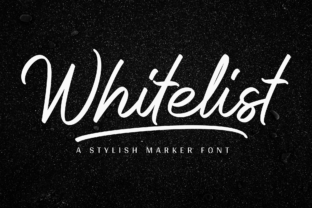
Give Your Small Business a Refined Voice with Whitelist Font
As a small business owner, you know that every detail matters. From the way you wrap a package to the tone of your social media captions, your brand is built on countless small choices. One of the most powerful yet often overlooked details is the typeface you choose. The right font does more than just display words—it shapes how customers feel about your business before they even read a single sentence. That is where Whitelist steps in. This stylish and elegant marker font gives your brand a handwritten, approachable, yet polished look that works across nearly every customer-facing material you create.
What Makes Whitelist Different from Everyday Fonts
Whitelist is not just another script font. It carries a distinct personality that blends sophistication with warmth. The letterforms have a natural flow, as if written with a premium marker by someone who takes their time. The strokes are confident but not rushed, giving each word a sense of intention. This makes Whitelist ideal for businesses that want to communicate quality, care, and a personal touch without sacrificing professionalism.
Unlike a standard serif font or a basic sans serif font, Whitelist brings emotion to your text. It feels human. When a customer sees Whitelist on a product label or a business card, they get the sense that a real person is behind the brand. That emotional connection is hard to achieve with more rigid typefaces. For a small business, this distinction can be the difference between being remembered and being overlooked.
Where Whitelist Shines in Real Business Materials
The versatility of Whitelist is one of its strongest assets. It works as a display font that grabs attention, yet it remains readable enough for practical use. Here are some realistic ways you can use it in your day-to-day business operations:
Product Labels and Packaging Design
Whether you sell handmade candles, natural skincare, artisanal coffee, or gourmet sauces, your packaging is often the first physical interaction a customer has with your brand. Whitelist adds an elegant, handcrafted feel to product labels. Imagine a soy candle with a simple kraft paper label, with the scent name written in Whitelist. It communicates "small batch" and "thoughtfully made" without needing a single extra word. On beauty product packaging, Whitelist can carry your brand name or product line with a refined, boutique quality that stands out on a shelf full of mass-produced items.
Logos and Business Cards
For many small businesses, the logo is the centerpiece of the brand identity. Whitelist works beautifully as a logo typeface, especially for businesses in creative fields, hospitality, or handmade goods. A bakery could use Whitelist for its logo on signage, bags, and online store. A coaching or wellness business might pair Whitelist with a clean sans serif font for a logo that feels both personal and professional. On business cards, Whitelist gives your name or tagline a distinct, memorable quality that people notice when they flip through a stack of cards after a networking event.
Menus, Flyers, and Signage
Café and restaurant owners can use Whitelist to create menus that feel curated and inviting. A handwritten-style font on a menu suggests homemade recipes and careful preparation. For flyers and event promotions, Whitelist works well as a headline font that draws the eye. On signage—whether a storefront window or an in-store display—Whitelist adds character that a standard serif font or sans serif font cannot match.
Thank-You Cards, Stickers, and Small Touches
One of the easiest ways to build customer loyalty is through thoughtful extras. A thank-you card with a handwritten-style note in Whitelist, or a sticker on a package, makes the unboxing experience feel personal. These small touches create moments of delight that customers remember and share. Whitelist adds a premium, boutique feel to these materials without requiring you to hire a calligrapher or spend hours hand-lettering each piece.
Social Media Graphics and Digital Ads
Your online presence is just as important as your physical materials. Whitelist works well on Instagram posts, Pinterest graphics, website banners, and digital ads. Because it is a display font, it is best used for headlines, quotes, or brand names in these contexts. Pair it with a clean, readable sans serif font for body text, and your social media feed will look cohesive and professional. When used consistently across posts, Whitelist becomes a visual cue that signals your brand, even before someone reads the caption.
Building a Consistent and Recognizable Brand Identity
Consistency is the foundation of trust. When customers see the same typeface across your website, packaging, business cards, and social media, they subconsciously register that your business is organized and reliable. A premium font like Whitelist helps you achieve that consistency without looking repetitive or boring. Because Whitelist has a distinct personality, it gives your brand a recognizable visual anchor.
For example, if you run an online shop selling handmade accessories, using Whitelist for your product titles and logo creates a thread that ties your Instagram posts, Etsy listings, and packaging together. A customer who follows you on Instagram will instantly recognize your brand when they receive a package in the mail. That recognition builds familiarity, and familiarity builds trust.
Readability in Real-World Settings
One common concern with script fonts is readability. Whitelist addresses this with clear, well-spaced letterforms that remain legible even at smaller sizes. On product labels where space is limited, or on mobile screens where text is scaled down, Whitelist holds up well. Of course, it works best as a headline, logo, or accent font rather than for long paragraphs of body text. For product descriptions, ingredient lists, or longer website copy, pair Whitelist with a clean sans serif font or a readable serif font to ensure your customers can easily access important information.
When using Whitelist in digital contexts, test it on different screen sizes. Check how it appears on a smartphone, a tablet, and a desktop monitor. On printed materials, order a proof or print a sample before committing to a large run. This simple testing step helps you catch any readability issues early and ensures your brand looks its best everywhere it appears.
Testing Whitelist Before Full Implementation
Before you apply Whitelist across every touchpoint, take time to test it in a few specific contexts. Create a mockup of your logo, a product label, and a social media graphic. Show these to a few trusted customers or friends and ask for their honest feedback. Does the font match the feeling you want your brand to convey? Does it look as good on a small sticker as it does on a large banner? These small tests save you from making a costly rebranding mistake later.
Also consider how Whitelist interacts with your existing brand colors and visuals. A sophisticated script font like Whitelist pairs well with muted, natural tones, but it can also pop against bold backgrounds. Experiment with different combinations to find what feels right for your specific business.
Simple Font Pairing Ideas That Work
Using Whitelist on its own is effective, but pairing it with a complementary typeface can elevate your brand even further. Here are three practical pairings to consider:
- Whitelist with a clean sans serif font: This is the most versatile combination. Use Whitelist for your logo, headlines, and product names. Use a simple sans serif font like Montserrat, Open Sans, or Lato for body text, descriptions, and contact information. This pairing creates clear visual hierarchy and keeps your materials easy to read.
- Whitelist with a classic serif font: If your brand leans toward a more traditional or luxurious feel, pair Whitelist with a serif font like Playfair Display or Merriweather. The script adds warmth, while the serif adds authority. This works well for premium product lines, coaching businesses, or boutique services.
- Whitelist with a minimalist handwritten font: For a casual, artsy brand, you can pair Whitelist with a simpler handwritten font for secondary text. Just be careful that the two handwritten styles do not compete. Use Whitelist as the dominant voice and keep the secondary font more understated.
Understanding Commercial Font Licensing
Before you use Whitelist on any customer-facing materials, take a moment to review the commercial licensing terms. If you are using the font for your own business branding, packaging, products, marketing materials, or client work, you likely need a commercial license. This is especially important if you are selling products with the font on the label, using it in templates you sell, or applying it to merchandise. Checking licensing early prevents legal headaches and ensures you are using the font ethically. Script Amp and other font marketplaces typically provide clear licensing information with each purchase, so read those terms carefully.
Whitelist as a Long-Term Brand Asset
Investing in a premium font is not an expense—it is an investment in your brand's future. Whitelist is the kind of typeface that stays relevant because it does not chase trends. Its elegant, handwritten quality feels timeless. Once you integrate it into your brand identity, it becomes a design asset you can rely on for years. You will use it on product labels, packaging design, business cards, website banners, Instagram graphics, menus, flyers, thank-you cards, and so much more.
For small business owners, time is precious. Choosing a font that works across so many touchpoints saves you from constantly searching for new typefaces for every project. Whitelist gives you a consistent, professional, and recognizable look that you can apply quickly and confidently. Whether you are launching a new product line, refreshing your brand, or starting from scratch, Whitelist offers a stylish and elegant solution that helps your business stand out without saying a word.